Food Services Parent Letter - 2026-2027
Posted Date: 08/14/26 (09:00 AM)
August 2026
Dear Parents/Guardians & Students:
The purpose of this letter is to outline and hopefully answer questions concerning breakfast and lunch, meal charging, the cafeteria’s computerized point of sale, automated prepayment systems and cafeteria mandates. Please read the following information carefully, and if you have any questions that remain unanswered, feel free to email foodservices@npsct.org or call the Foods and Nutrition Services Office at 860-665-8635.
Breakfast Prices
ALL Students are eligible to receive one FREE breakfast daily for SY 2026-2027.
- Middle & High Schools - Breakfast is available daily before school in the cafeteria beginning on the first day of school. Breakfast will be served on delayed opening days at Newington High School and John Wallace ONLY (it will NOT be served at Martin Kellogg ).
- Elementary Schools - Breakfast will begin on the first day of school for 1st through 4th grades. Kindergarten and Pre-K students will begin breakfast on Monday, August 31st. Breakfast will be available daily in the cafeteria from 8:35-8:50 a.m. but will NOT be available on delayed openings or when school is closed. Students will go down to the cafeteria to pick-up their breakfast after dropping their belongings off in their classroom and return to their classroom to eat their breakfast.
Lunch Prices
Full pay students may purchase lunch on a daily basis for $3.75 at the middle and high schools and $3.25 at the elementary schools. Eligible students who are approved for free or reduced-price meals are able to receive one lunch per day for FREE for SY 2026-27.
Full pay students may purchase lunch on a daily basis for $3.75 at the middle and high schools and $3.25 at the elementary schools. Eligible students who are approved for free or reduced-price meals are able to receive one lunch per day for FREE for SY 2026-27.
School menus may be found here:
https://www.npsct.org/school-menus
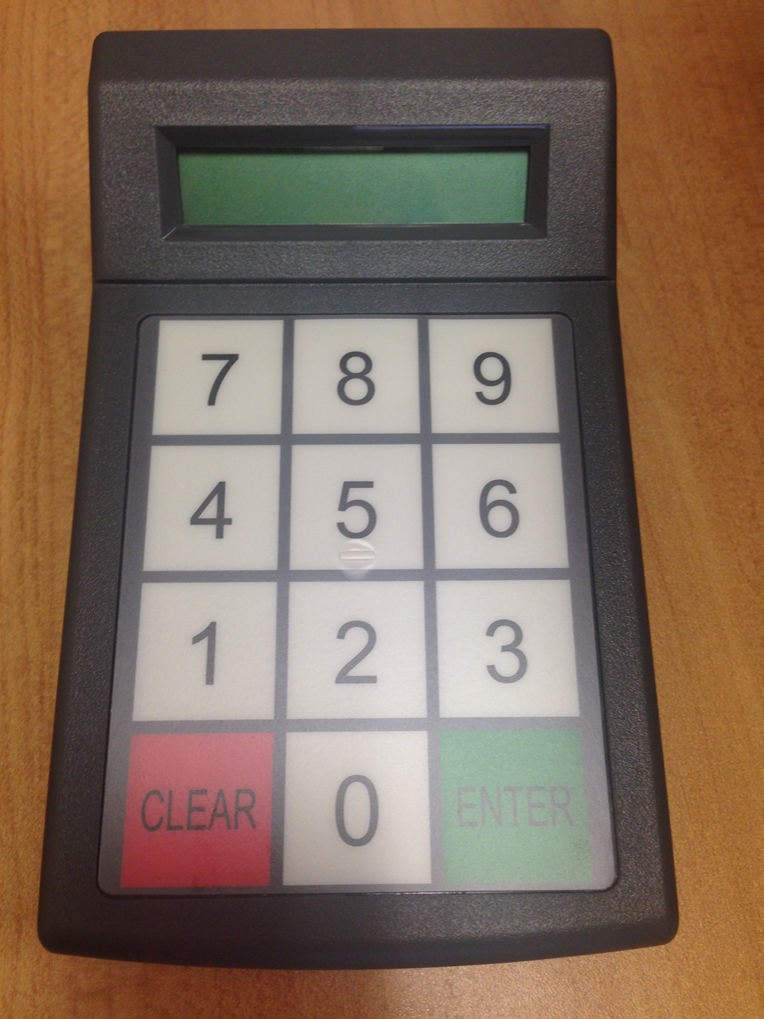
During meal service, your child will need to enter his or her five digit student identification number into a keypad (see picture at the end of the letter) located at the end of the serving line near the cashier in order to access his or her meal account. You can find your child’s student identification number on the PowerSchool website (not the App) on the "Grades and Attendance" page. Please ask your child to memorize this number. Staff will still be able to access your child’s account if they forget his or her number. Your child’s student identification number will not change while enrolled in the Newington Public Schools. Pre-K & Kindergarten students will receive a laminated card with their student ID number on it. Please work with your child to help them with memorizing their number.
After your child enters his or her student ID #, the cashier simply presses the meal key and any snack purchases your child is selecting and off he or she goes! The price of the meal and snacks is deducted from your child’s account. The point of sale system knows how to charge student meals accordingly; free, reduced or paid. A parent/guardian will need to deposit money into their child’s account for meal and/or snack purchases.
Insufficient Funds
Students whose accounts have insufficient funds, and who do not bring a meal or other funds to school to pay for meals, may charge meals (excludes a la carte items) to their meal accounts. If a student’s meal account becomes depleted, Nutrition Services will provide a meal of the student’s choice.
Collection of Unpaid Meal Charges
The parent/guardian of students with negative account balances will receive a daily email with repayment information as well as information on free and reduced meals, local food pantries and SNAP benefits. The student will continue to be served a full meal and the account will be charged accordingly. Negative balances will remain with the student through their school career.
EZSchoolPay Information (Online payment system for school meals)
Our department offers an automated prepayment system called EZSchoolPay that allows you to view your child’s meal account balance and purchases, receive low balance e-mails, as well as, make deposits into your child’s school meal account via the internet. There is a convenience fee to make on-line payments. Simply log on and use a credit card or debit card to fund your child’s account. You may find an EZSchoolPay Parent-User-How-To Guide at: https://www.npsct.org/pricing-meal-prepayment
How do I pre-pay for meals and snack items?
There are two ways to put money onto your child’s meal account:
- You may set up an account through www.EZSchoolPay.com and pre-pay on-line whatever dollar amount you choose using a credit or debit card. You will be charged a $1.95 convenience/bank fee. You may also elect to participate in an auto replenish feature that allows you to set a low balance amount that will automatically replenish your child’s account at that balance from your credit card.
2. You may send in a check or cash to the school cafeteria. The food service staff will enter your check amount or cash amount into your child’s meal account. For safety purposes, we recommend that advanced payments be sent in the form of a check. Checks should be made payable to Newington School Cafeteria. (There is no fee for this method of payment.) Please put your child’s full name and student ID # (same # as your child’s PowerSchool number) on the check. Your child’s teacher will collect prepayments in the morning and forward to the cafeteria. All monies sent into the cafeteria can only be used for meal and snack purchases and cannot be used for any other school event(s).
How are funds that are deposited into my child’s account made available for purchases?
Funds are deposited and available to your child for the purchase of a meal and snack purchases in the cafeteria. There are no limitations as to what may be purchased or how many purchases can be made. The account balance simply decreases as purchases take place.
Please note that you can set up spending limits for your child in order to limit what can and cannot be purchased in the cafeteria through www.EZSchoolPay.com . There is no cost to do this.
How do I know the balance in my child’s account?
You can check your child’s account balance by registering your child on www.EZSchoolPay.com . There is no cost to do this. (You will need your child’s student identification number to do this which is their PowerSchool #). Registering your child on EZSchoolPaydoes not mean that you have to pay through EZSchoolPay, however, it allows you to view the account balance at any time on-line, as well as, receive e-mail reminders when the account balance gets below a dollar amount you select. It is strongly recommended that you sign up for e-mail account balance reminders as this is the best and most efficient method for parent notification when balances get low.
Can I view what my child has purchased?
Yes. You can log onto www.EZSchoolPay.com and view what your child purchased. (You must register your child on www.EZSchoolPay.com before using the purchase history feature.)
Do I need to use all the money in my child’s account this school year?
No. Any money left in your child’s account at the end of this school year will carry over to the next school year. Requests for refunds, account transfers or donations must be made in writing to foodservices@npsct.org
Cafeteria Mandates
Our school cafeterias are meeting tough federal nutrition standards for school meals, ensuring that meals are healthy and well-balanced and provide students with all the nutrition they need to succeed at school. Now is a great time to encourage your child to choose school meals!
The federal requirements include strict limits on the calories, saturated fat, trans fat, and sodium in school meals. We are meeting these nutrition standards by offering students a selection of low-fat and fat-free milk, larger portions of colorful fruits and vegetables, and a variety of whole grains and lean protein choices.
All breakfasts include three meal components:
- A grain such as a whole-grain waffle, pancake, muffin, etc. (or optional credited meats/meat alternates such as a yogurt, cheese stick),
- A fresh, dried, or canned fruit selection (or vegetables substitution); and
- Low-fat or fat-free milk selections.
All lunches include five meal components:
- A meat or meat alternative such as yogurt, lean beef, chicken, or low-fat cheese;
- A grain such as whole-wheat bread or brown rice;
- A fresh, dried, or canned fruit selection;
- Raw or cooked vegetables in a variety of colors; and
- Low-fat or fat-free milk selections.
Our district will be encouraging students to try the new foods offered this school year. We are also asking for your help. Please explain that every student needs to be prepared to select at least one fruit or vegetable with their lunch every day. We are planning our menus to include selections we know students like, as well as many different foods they may not have tried before. Please encourage your child to try these new foods. FREE SAMPLES are available upon request. They might just find a new favorite!
WE NEED YOUR HELP!
In order for students to move through the serving line as quickly as possible, it is important that your child knows his or her student identification number. Your child’s student identification number can be found on the PowerSchool website (not App) on the "Grades and Attendance" page. Please ask your child to memorize this number. Below is a picture of what the keypad will look like. All students will need to hit the GREEN enter button after he or she enters his or her student identification number. Thank you for your help.